Friday, September 16, 2016

OBIEE 12c Installation on Windows


Pre-requisite

a) Oracle Database installation (version 11.2.0.4 or higher)
B) JDK Installation


Steps Involved

a) Install Weblogic Server 12c
b) Install OBIEE 12c
c) Create BI Schemas using RCU
d) Set Environment Variables
e) Create BI Domain


Download OBIEE 12c installation files (and Weblogic Server file) from OTN)


Unzip the folders


Download Weblogic server and unzip


Unzip ->


Below .jar file is inside the folder

Install Weblogic Server 12c

Open command prompt as Administrator


Navigate to location where above .jar file exist
i.e. cd C:\vikasarora\Software\OBIEE12C\fmw_12.2.1.0.0_infrastructure_Disk1_1of1

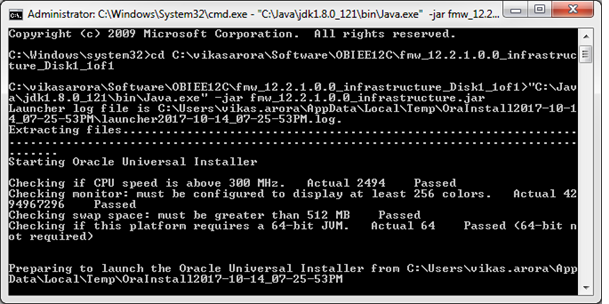
Execute as below
C:\vikasarora\Software\OBIEE12C\fmw_12.2.1.0.0_infrastructure_Disk1_1of1>"C:\Jav
a\jdk1.8.0_121\bin\Java.exe" -jar fmw_12.2.1.0.0_infrastructure.jar


Click Finish.


Install OBIEE 12c

We download two zip files from OTN


Unzip both the zip files and place them in a separate folder-


If you do not place files in a separate folder you my get error
"Could not extract the archive since it is corrupted. Error code=1"


Run the application as Admin


Specify Oracle Home.


Click Install.


Click Finish.

Create BI Schema using RCU utility


Right Click RCU.bat and Run as Administrator.


(I got this warning, my database is 12c version)


I ignored.


Change the selections as shown above.


Set Environment Variable for BI


Create a BI Domain


Go to <MW_HOME>bi\bin folder and run config.cmd


Select use Existing schema


Saturday, July 2, 2016

Tableau Products


Tableau Server
Tableau Desktop
Tableau Public
Tableau Online
Tableau Reader


Tableau Reader:

Its a free desktop application that can be used to  view the Workbook created by others.

Usually when a developer creates a Workbook he would upload it on Tableau Server for others to view, or other can open the workbook if they have Tableau Desktop, which is a paid product.

So when you want to share the workbook with other who are outside your enterprise (i.e. bi access to your Tableau Server) and do not have Tableau Desktop (since it needs license); other can use Tableau Reader to view the Workbook.


Distributing content with Tableau Reader require that the Workbook should be Packaged one. Tableau Packaged Workbook (.twbx) require local file sources such as Excel, Access, text/csv files, Tableau Data Extract files(.tde)

Tableau Online:

Its is Tableau Server on the Cloud.

Thursday, March 3, 2016

Viewing SQL of a Report in Tableau


1. In Tableau Desktop, open the workbook and navigate to the worksheet


2. On the toolbar, Select Help->Settings and Performance-> Start Performance Recording


3. Refresh the data, forcing Tableau to re-run the SQL


4. Select Help-> Settings and Performance-> Stop Performance Recording


5. This will open up a new Workbook with Performance stats


Wednesday, February 3, 2016

Features to consider while selecting Reporting/Analytic tool


Features to consider while selecting Reporting/Analytic tool-


  1. Does BI tool has semantic layer? like RPD in OBIEE and Universe i think in Business Object? The idea is to create Data Models in the semantic layers and use them to create multiple reports.
  2. Does BI tool  has provision of creating hierarchies? If yes, can we create ragged and skip level hierarchies?
  3. Self-Service BI
  4. Advanced Analytics (KPI/Scorecard)
  5. Ease of Deployment
  6. Ad-hoc reporting
  7. Slice and Dice
  8. Drilling up/down/ Drill Through
  9. Constraint Prompt (or Cascade Filter)
  10. Formatted Reports (Pixel Perfect Report)
  11. Report Bursting
  12. Geospatial Analysis
  13. Ease of Filtering data on dashboard
  14. Development Life-cycle
  15. Ability to export the reports in excel/csv/pdf etc
  16. Can be Deployed on Cloud?
  17. Conditional Delivery of Reports (i.e. deliver the report in user's mail box only when sales drops below a pre-set-level).
  18. Conditional formatting supported (highlights cells in red when sales drops below a level and highlight in green when it is above a level etc.)
  19. Writeback Support
  20. Event driven cache/extract refresh
  21. Do we have provision of Guided Navigation?? i.e. one dashboard has multiple reports but which report will be visible will depend of a certain condition and that certain condition is derived by another report).  OBIEE has this Guided Navigation feature.
  22. Can the BI tool's semantic layer connect to Cubes?
  23. Does BI tool support Impersonation?


Tuesday, February 2, 2016

ETL Best Practices

Some of the Best Practice or Consideration in ETL


1) Running Scripts in Parallel:
As much as possible the code should run in parallel. Like all the staging tables can be loaded from the source database in parallel. Subsequently all the scripts that load the data from staging into dimensions tables can be be run in parallel, provided they do not have dependency on each other.In case of dependencies the sequential loading can be performed.

2) Periodic Maintenance:Vaccum and Analyze can be performed periodically, these are for databases like Amazon Redshift and Greenplum. For database like Oracle we should refresh the statistics of the tables and Indexes periodically usually during off hours.

3) Handling Bad Data:Handling bad data, in case there is bad data in the source data, instead of rejecting the entire load we can process the good data and load the bad data into a error log table and also generate the email alert informing set of users (business and/or technical).

4) Parameters: Use of Metadata or Control table. The code should be parameterized. For example, the connection details of the source and target data should be in parameter file or in a central place, like  source/target host name, userid/password etc. The idea is to not to have these kind of details in the code and avoid touching all the script if we need to point to a different source or target database.

5) Incremental Load:As much as possible we should try for loading the data from source to target (in staging) incrementally. This will have substantial effect on  overall ETL time. (If need, we can consider implementing CDC, Change Data Capture)


6) Consistent Method Error Handling and Notification

7) Which Data Warehouse Approach: 

There are mainly two DW approaches - Top Down and Bottom Up. The selected approach will deeply effect the DW life cycle.

Top Down: Build Enterprise Data Warehouse First and feed the Data Marts later.

Bottom Up: Build the Data Marts first and then Enterprise Data Warehouse from the DMs as and when needed.


8) ETL Tool Selection: 
A very crucial step specially for a new Data Warehouse initiative. A comparison of ETL tools can be performed providing weightage against various features that the ETL tool support. There could be a case when one ETL tool performs great in a specific feature but then we don't need that feature in our DW so in that case our tool selection may not heavily depend on that feature and we may assign less weightage against that. This way we can create a matrix and make a decision based on over all scoring. 


9) Master Data Management:
(The aim of the Data integration is to provide 360 degree view of the enterprise data. Data integration would be necessary when the end reports from the BI system would include data elements from various source systems.

For the context of our ETL environment, data integration takes the form of conforming dimensions and conforming facts in the data warehouse. Conforming dimensions means establishing common dimensional attributes across separated fact tables so that “drill across” reports can be generated using these attributes. Conforming facts means making agreements on common business metrics such as key performance indicators (KPIs) across separated databases so that these numbers can be compared mathematically for calculating differences and ratios.)


Reference: 
http://www.computerweekly.com/tip/Six-ETL-best-practices-followed-by-Shoppers-Stop

https://www.timmitchell.net/etl-best-practices/

http://www.dataintegration.info/etl


Features to Consider While Selecting ETL Tool


Features for consider while selecting ETL tool-


  1. Easy to Use
  2. Large Volume Performance
  3. Built-in Schedular
  4. Non-RDBMS Connections
  5. Join Multiple Sources  (Heterogeneous)
  6. Deploy in Cloud Option
  7. Complex Transformation
  8. System Platform Supported
  9. SCD Support
  10. Debugging Facility
  11. CDC Support
  12. Command Line Operations
  13. Job Controlling and Scheduling
  14. Commercial  or Open Source
  15. Built-in Version Control


Tuesday, January 12, 2016

Full Extract vs Incremental Extract


There are two approaches to refresh an Extract-> Full Refresh and Incremental Refresh

Full Refresh-> 

As the  name says the Extract will be fully refreshed. All the  data/rows in the Extract will be completely replaced by the new data/rows from the data source.

This is the default refresh.

Depending on the number of records we fetch, it may sometime be expensive on the data source and may take long time.


Incremental Refresh->


Rather than refreshing the entire extract, we can set it up to only add the rows that are new since the last time we extracted data. For example, we may have a data source that is updated daily with new sales transactions. Rather than rebuild the entire extract each day, we can just add the new transactions that occurred that day. (Then once a week you may want to do a full refresh just to be sure you have the most up to date data.)


But before configuring Incremental refresh we need to check following->

a) Does the data always gets inserted and never gets updated / Deleted ?


b) Does the data set have a unique key (A integer serial number which always increase or a date that always increase)?


If answer to both these questions in "Yes" then only we should configure Incremental Refresh or else we have to go for Full Refresh.


Reference:
https://community.tableau.com/thread/204061


Sunday, January 10, 2016

Data Warehouse Design Approaches (Inmon vs Kimball)


When we consider the Data Warehouse approaches, there are primarily two approaches- Top-Down and Bottom-Up

The selected approach will deeply affect the Data Warehouse lifecycle.


Top-down (Inmon’s Approach)

In this approach, first the Data Warehouse is built which is mostly a normalized Data Model and thereafter Data Marts are fed from the Enterprise Data Warehouse. The DMs are specific to subject area or departments.


Advantages of This Approach:

The Enterprise Data Warehouse has the data from most or all departments of the Enterprise. 
We will have integrated Data Warehouse. We can generate analytics for across the Subject Areas or Departments. 

Disadvantages of This Approach:

  • High initial cost.
  • Integrating Master Data from all the departments would be challenging. It may lead to implementation of Master Data Management which itself is substantial undertaking.
  • It will take significant to time to come up with a even small prototype of reporting; and business users may lose interest and trust.
  • Long term implementation plan may be discouraging.


Bottom-Up (Kimball’s Approach)


In this approach, the Data Marts are created first, each specific to a particular subject area or department of the organization. 


And as and when required, the Data Marts can combine into a larger Data Warehouse.
Kimball’s Data Warehouse architecture is also known as Data Warehouse bus (BUS).
Takes lesser time, shorter time for initial setup.

Which approach to choose?

It depends on the business objective of the organization, nature of business, time and cost.

Inmon’s approach is more suitable for stable businesses where business changes are not very often. With changes, they do not change the design instead they accommodate the changes in existing data model.

However, if the focus is on quick win, the Kimball’s approach is more suitable.

Saturday, December 12, 2015

Create Basic Date Dimension with Data


This statement will create basic Date Dimension table with data starting from 1-Jan-2014 and till plus 2000 days.


CREATE TABLE DATE_DIM AS
  SELECT
       n AS Date_ID, -- (This is just a serial number not a date)
   1 as DATE_KEY,
       TO_DATE('31/12/2013','DD/MM/YYYY') + NUMTODSINTERVAL(n,'day') AS Full_Date, --- (PK)
       TO_CHAR(TO_DATE('31/12/2013','DD/MM/YYYY') + NUMTODSINTERVAL(n,'day'),'DD') AS Days,
       TO_CHAR(TO_DATE('31/12/2013','DD/MM/YYYY') + NUMTODSINTERVAL(n,'day'),'Mon') AS Month_Short,
       TO_CHAR(TO_DATE('31/12/2013','DD/MM/YYYY') + NUMTODSINTERVAL(n,'day'),'MM') AS Month_Num,
       TO_CHAR(TO_DATE('31/12/2013','DD/MM/YYYY') + NUMTODSINTERVAL(n,'day'),'Month') AS Month_Long,
       TO_CHAR(TO_DATE('31/12/2013','DD/MM/YYYY') + NUMTODSINTERVAL(n,'day'),'YYYY') AS YEAR
   FROM (
   SELECT LEVEL n
   FROM dual
   CONNECT BY LEVEL <= 2000
   );
   
update DATE_DIM SET DATE_KEY = YEAR||Month_Num||Days ;
--DATE_KEY in in format YYYYMMDD

Sunday, November 15, 2015

Data Warehouse Hardware Sizing (Disk/RAM/CPU)


While deciding on the sizing of hardware required we are primarily looking for 

1) Disk Space Required for Machine hosting Data Warehouse
2) RAM on the Machine
3) CPU

This is for ELT method where Data Warehouse and Integration Server would reside on same machine.

(not the ETL, where DW and integration server will be on different machines)


Disk Space: We will need to  consider following->

a) What size of master tables and transaction tables we will pull from source system into Data Warehouse that will form Dimensions and Facts.

b) Space would be needed by staging area. We may not pull all the columns of a particular table, we may pull only selective columns so space needed would be less.

c) The tables in source system will be in Normalized form whereas in DW they are demoralized so there would be redundancy and so  more space need for them in DW.

d) The dimensions that we create in DW may need to retain history, i.e. SCD implementation so space needed would be more.

e) The indexes created on Dimension and Fact tables would need space.

f) There would be aggregated/ summarized tables and/or MVs over and above leaf level fact tables so space would be needed  for them. The number of summary level fact would depend on the levels in dimensions, more the levels in dimensions more summary tables would require. Indexes would be required in summary tables also so would need space.


Wednesday, August 12, 2015

Master Data and Reference Data


Master Data:

A master data is information that an enterprise agree upon. And enterprise may or most likely to have several departments like HR, Marketing, Sales, Procurement, Manufacturing etc.

Now all these departments may have different system, HR department may have some HRMS, Marketing and Sales departments may have some Marketing and/or Sales Management system.

You would have products in the Marketing system and in the sales system too. That product data should be same in both the system, these are the products that both Market and sales agreed to use. It should not happen that both the 
systems have different set of products.

Another example could be Customer data.

Another example could be Employee data.

Another example could be Supplier data.

Reference Data:

Reference data is something that defines permissible limits to use the data.
Like currency codes which would be very much standards and would rarely change.

Reference data is mostly used to maintain data quality or data validation or data standardization purpose. 

If I am maintaining currency codes, then all the systems (be it HR, Sales etc..) should use same currency codes.


Another example of reference data could be Country Codes or State Codes.

Saturday, August 1, 2015

Tableau Vs OBIEE


The major difference between OBIEE and Tableau is that Tableau doesn't really have a semantic layer (the BMM layer in OBIEE).  With Tableau, we have to have data well manicured (cosmetic treatment) in order to work effectively.  There are differences but thetwo can and should co-exist in any organization.

Tableau Merits Over OBIEE

·         Quick and rapid development of reports and dashboards.  Easy enough for business people to figure out with little to no training.  Companies may use Tableau for prototyping and then building the enterprise wide reports in something like OBIEE.
·         Great desktop reporting tool.
·         Has an excellent recommendation tool for which type of visual analysis to use based on selected data.
·         Almost true WYSIWIG.
·         Positioning of dashboard objects much more flexible.
·         Good free on demand training and extremely active user community.
·         Maps are very easy to use with lots of cool functionality.


OBIEE Merits Over Tableau

·         More advanced dashboarding capabilities such as conditional guided navigation.  Also much better at managing tons of dashboards. Use of sub reports.
·         Stronger enterprise level security and user management.
·        Shared reporting objects like filters
·         Better at federating data (connecting to multiple sources) than Tableau.  Tableau can do it and is OK at it, but OBIEE is the best of all reporting tools at it.
·         The best functioning KPI/scorecard reports,  an area where OBIEE rocks the competition.
·         Great integration to other Oracle products. IE, can interface directly with Fusion/EBS/Forms.
·         Has multi-user development support and better environment management/migration.  we don't need multiple environments for Tableau or multiple users working on the same reports.
·         Ad-Hoc reports can be created through the web interface by any user you grant access to.  That user, however, is limited to what you have defined in your semantic layer.  Tableau requires their client to do ad-hoc.  However, the user can then do any kind of logical calculations or other data manipulation they wish.
·         Can cache queries.  Works very well and write very efficient SQL when directly querying databases.  Tableau has a proprietary data format that basically works as a cube, which can slow down very quickly on large data sets.  It also is is pretty lackluster at performing direct queries in the database.


While Tableau continues to add features very quickly, it isn't up to a true enterprise wide reporting platform.  It is still best served for departmental use in the hands of a data analyst.

OBIEE requires a lot more effort to create even basic visualizations and usually requires a full development team.


There are pros and cons to both.  

Difference between Data Blending and Data Join


Joining is where you are able to combine data from the SAME data source, for example worksheets in an Excel file or tables in an Oracle database.  You need a common field, also called a key, that tells Tableau how to join the data.  You also need a key to do blending.


Blending is where you able to combine data from DIFFERENT data sources, for example a worksheet in Excel with a table from an Oracle database.  This is very powerful because in the past you would typically need to have someone with the specific technical skills create a new data set with the combined information.

Wednesday, July 1, 2015

Tableau: Connections you can make with your dataset


We can either connect live to our data set or extract data onto Tableau.

Live: Connecting live to a data set leverages its computational processing and storage. New queries will go to the database and will be reflected as new or updated within the data.

Extract: An extract will make a static snapshot of the data to be used by Tableau’s data engine. The snapshot of the data can be refreshed on a recurring schedule as a whole or incrementally append data. One way to set up these schedules is via the Tableau server.


The benefit of Tableau extract over live connection is that extract can be used anywhere without any connection and you can build your own visualization without connecting to database.


When to use Live Connection:


When you need more updated data,  or if the data is updated in the database more frequently and you need updated data to reflect in the workbook/dashboard.


Database is Fast.


When to use Extract:


When Database is not fast enough for interactive analysis (you change the value in the filter and workbook takes long to refresh)


When you want to take the load off the database.


When you need to be off line (in air plane)and want to play with the workbook.


Friday, January 9, 2015

Early Arriving Fact (or Late Arriving Dimension)


What early arriving facts are? (Or late arriving dimension)

An early arriving fact, when a fact record arrives at the data warehouse before its dimension record. 


when we lookup the surrogate key in our dimension table using the fact table natural key, the dimension member doesn’t exist (yet).


In many cases when we load our data warehouse, we would assume that dimensions and facts would arrive at the same time, or dimension would arrive before fact record that has reference to the dimension.


The reasons why we have to be able to handle early arriving facts are many

a) multiple source systems and/or
b) different load frequencies seems to be the dominating factors.

We might be loading our dimensions using a full load strategy with one load schedule, while using an incremental load strategy for our fact table with a close to real-time frequency.


An employee availing medical insurance through his employer is eligible for insurance coverage from the first day of employment. But the employer may not provide the medical insurance information to the insurance provider for several weeks. If the employee undergo any medical treatment during this time, his medical claim records will come as fact records with out having the corresponding patient dimension details.

Design Approaches

Depending on the business scenario and the type of dimension in use, we can take different design approaches.
1. Hold the Fact record until Dimension record is available.
2. 'Unknown' or default Dimension record.


1. Hold the Fact record until Dimension record is available
One approach is to place the fact row in a suspense table. The fact row will be held in the suspense table until the associated dimension record has been processed. This solution is relatively easy to implement, but the primary drawback is that the fact row isn’t available for reporting until the associated dimension record has been handled.

This approach is more suitable when your data warehouse is refreshed as a scheduled batch process and a delay in loading fact records until the dimension records are available is acceptable for the business.

2. Unknown' or default Dimension record
Another approach is to simply assign the “Unknown” dimension member to the fact record. On the positive side, this approach does allow the fact record to be recorded during the ETL process. But it won’t be associated with the correct dimension value. 

The "Unknown" fact records can also be kept into a suspense table. Eventually, when the Dimension data is processed, the suspense data can be reprocessed and associate with a real, valid Dimension record.

Thursday, November 20, 2014

Enable or disable caching in the system level and table level


Disable Caching for the System

You can disable caching for the whole system by setting the ENABLE parameter to NO in the
NQSConfig.INI file and restarting the Oracle BI Server. Disabling caching stops all new cache entries
and stops any new queries from using the existing cache. Disabling caching allows you to enable it
at a later time without losing any entries already stored in the cache.

Caching and Cache Persistence Timing for Specified Physical Tables


You can set a cachable attribute for each physical table, allowing you to specify if queries for a that
table will be added to the cache to answer future queries. If you enable caching for a table, any query
involving the table is added to the cache.

[Vikas Arora]:
The NQSConfig.ini – Parameter ENABLE controls the global level setting. If this is set to NO then even if we set “Cache Never Expires” for individual tables then also the query that accesses that table is not cached.
If the ENABLE parameter is set to YES and then “Cache Never Expires” for individual table is checked then query accessing the table is cached. The location of cache is mentioned in NQSConfig.ini in parameter DATA_STORAGE_PATHS.


If the ENABLE parameter is set to YES and then “Cache Never Expires” for individual table is not checked then query accessing the table is not cached.